How to send an SMS for free from Gmail
Gmail lets you send free SMS messages to most cell phone networks. This guide we will explain how to add this option to your email and also what are the benefits and limitations
Medium 5,414 views
What You'll Need
- SMS
- שליחת הודעת טקסט חינם
- SMS חינם
- GMAIL
- שליחת אס אם אס מGMAIL בחינם.
Steps
- 1
Step 1
First of all you should know that you have a limit of 50 SMS's you can send for free from Gmail But don't worry, as soon as you get a SMS reply, your Gmail account gives you another 5 free SMS's - up to the limit of 50 Is it likely that anyone would reply with an SMS to your Gmail? - Well, if you do not get one, you can send a SMS message to your own phone and reply to it with a SMS message. This way you will be paying your phone provider for the 1 message and get 5 more for free from Gmail. 5 for the price of 1 is a good deal in my opinion. If you use up all of your 50 free SMS's you can wait 24 hours and get 1 free - 2
Step 2
Now the technical part: First, login to your Gmail account. -
- 3
Step 3
At the top of the screen on the top right you will see an icon of "google labs" tube-shaped. Click on the icon. - 4
Step 4
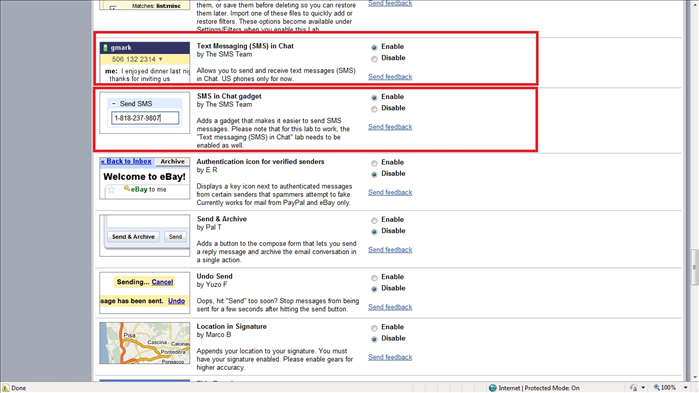 Look for the options: "Text messaging (SMS) in chat" And "SMS in chat gadget" Check both to Enable Option.
 - 5
Step 5
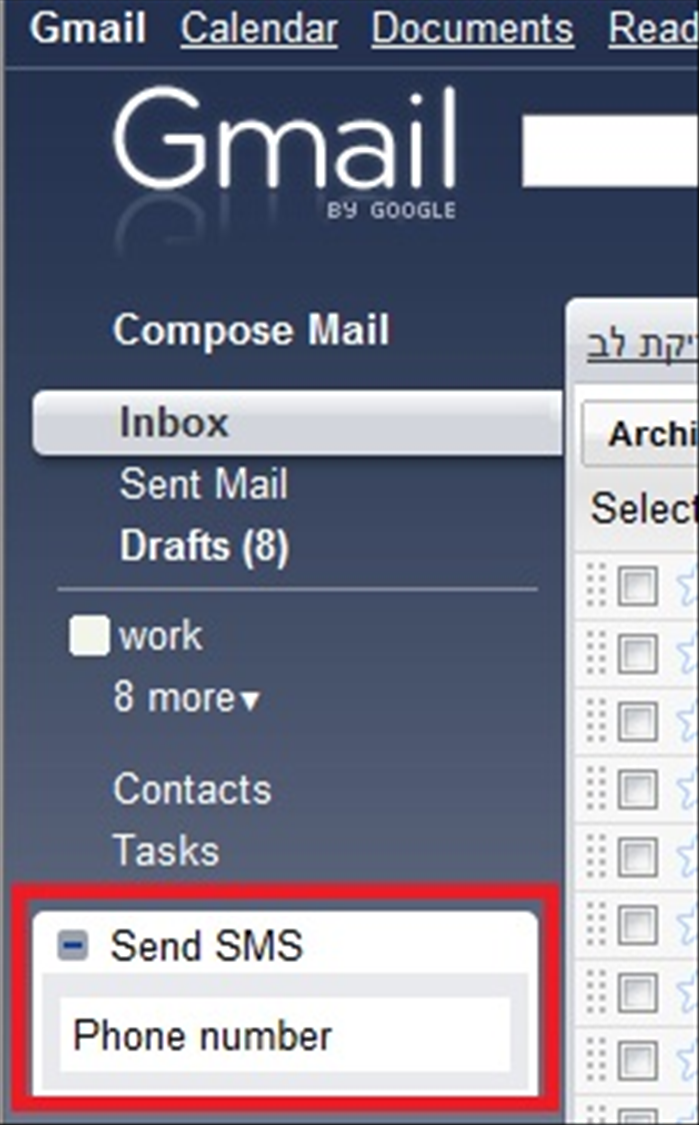 After you return, on the left side the mailbox window will appear where you can send the SMS to a phone number. Insert a number and press enter.
 - 6
Step 6
A pop up will appear asking which country and city you want to send the SMS to and to save the information for future use.