How to send encrypted e-mail
If you have sensitive information that you would like to email, you may want to think about sending it encrypted. You never know who can get your information along the way.
Medium 1,105 views
What You'll Need
- קידוד
- דואר אלקטרוני
- הצפנה
- חתימה דיגיטלית
Steps
- 1
Step 1
 בכדי לשלוח דואר מקודד לנמען, קודם כל לנמען ולך צריכה להיות את אותה חתימה דיגיטלית שכוללת certificate וpublic key - כלומר עליך לשלוח לנמען את החתימה שלך בדואר האלקטרוני בכדי שיכיר אותה ועליו לשלוח אליך את החתימה שלו בכדי שתכיר את שלו. האינפורמציה הזאת מוכיחה לנמען שאתה זה שחתמת על הדואר האלקטרוני ולא מתחזה.
 - 2
Step 2
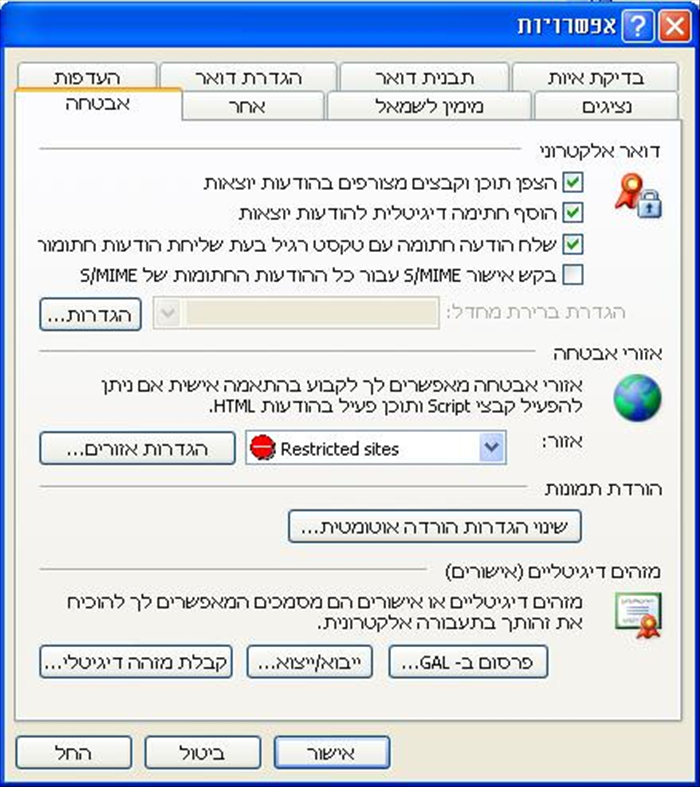
 בכדי לאפשר חתימה דיגיטלית והצפנה לדואר היוצא שלך, היכנס ללשונית "כלים" ולחץ על "אפשרויות". בחלון ה"אפשרויות" לחץ על לשונית "אבטחה". סמן את "הצפן תוכן וקבצים מצורפים בהודעות יוצאות" וסמן גם את "הוסף חתימה דיגיטלית להודעות יוצאות"
 -
- 3
Step 3

 פתח הודעת דואר חדשה (שברצונך לשלוח) ולחץ על כפתור "הוסף חתימה דיגיטלית" ועל כפתור "הצפן הודעה" (שתי המעטפות בצד הימני של הסרגל) מלא את שדות הנמען, נושא ותוכן ושלח. אל תשכח ללחוץ שוב על הכפתורים האלו בכדי לבטל אותם לאחר השימוש.