How to stop receiving email notifications from Facebook
Facebook is a very popular site that allows everyone to remain updated about the lives of their friends. They can share pictures, experiences and thoughts. Whenever a Facebook friends performs an certain actions related to you such image tagging, book events, group input, etc. you are sent an email notification. It would be nice once in while. If some friends are very active it can be annoying (for some people) and it fills up your mailbox with messages that can distract you from emails you need to take care of. To avoid such a situation we will explain how to stop these notifications.
Easy 1,363 views
What You'll Need
- פייסבוק
- התראות
- מיילים
- לשונית
Steps
- 1
Step 1
היכנסו למשתמש הפייסבוק שלכם. - 2
Step 2
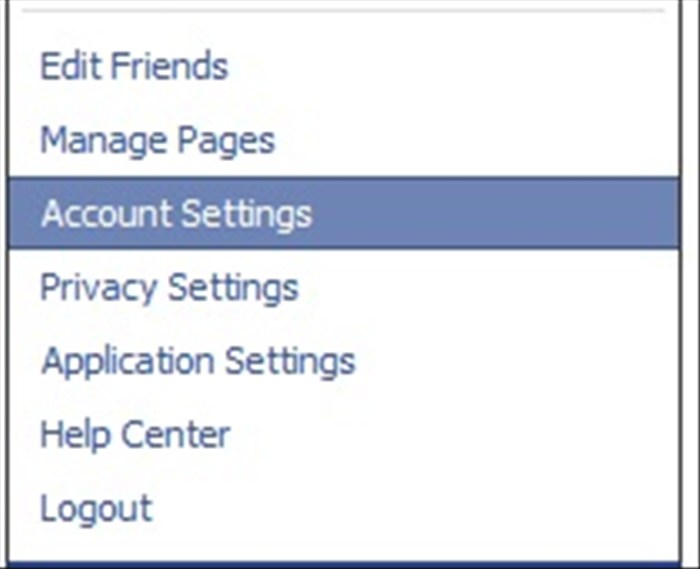 בתפריט העליון בחרו בלשונית ה"Account" ובתפריט שנפתח בחרו ב"Account settings"
 -
- 3
Step 3
 בחרו בלשונית ה"Notifications" .
 - 4
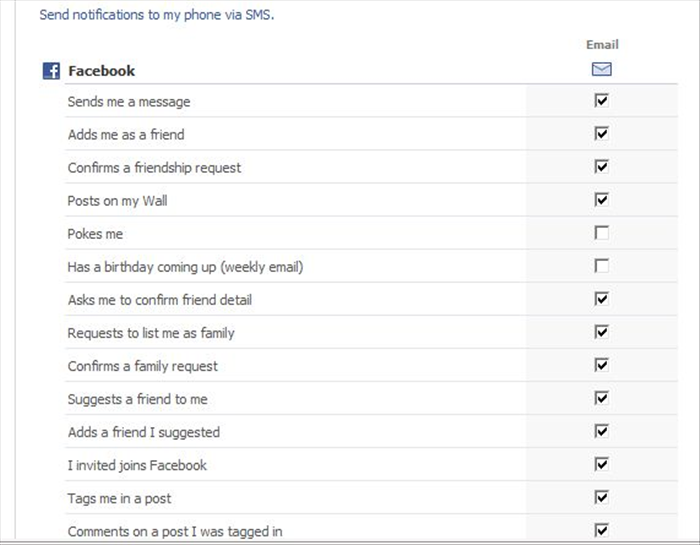
Step 4
 בלשונית זו תוכלו לבחור אילו הודעות תרצו שפייסבוק ישלח אליכם, לדוגמא: אתם לא רוצים שפייסבוק ישלח תמונה כשמזמינים אתכם להצטרף לקבוצה? סמנו תחת "Groups" את כפתור ה"Off" בשורת ה"Invites me to join a group" וכד'.