How to add an image to a folder in Windows XP
You can make your folders a little more fun by adding a picture folder. It is an extremely effective trick that helps children use the computer.
Easy 996 views
What You'll Need
- תיקיות
- תמונות על תיקיה
- לשים תמונה על תיקיה
- Windows
Steps
- 1
Step 1
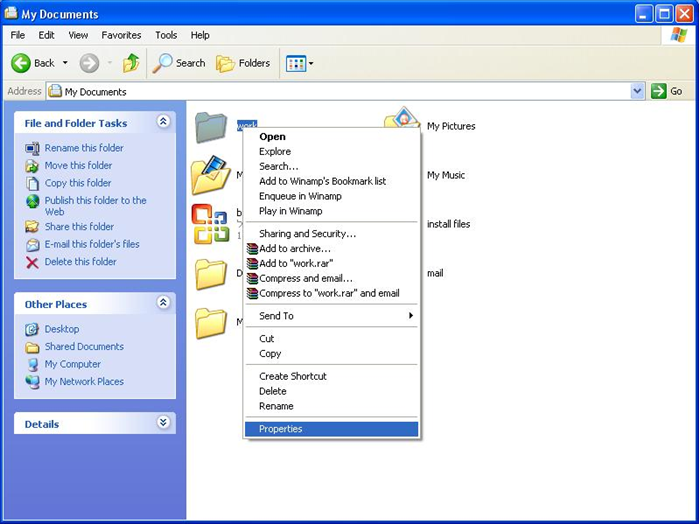
 פתחו את החלון שבו מופיעה התיקיה שברצונכם להוסיף לה תמונה. לחצו על כפתור הימני של העכבר ובחרו ב"properties"
 - 2
Step 2
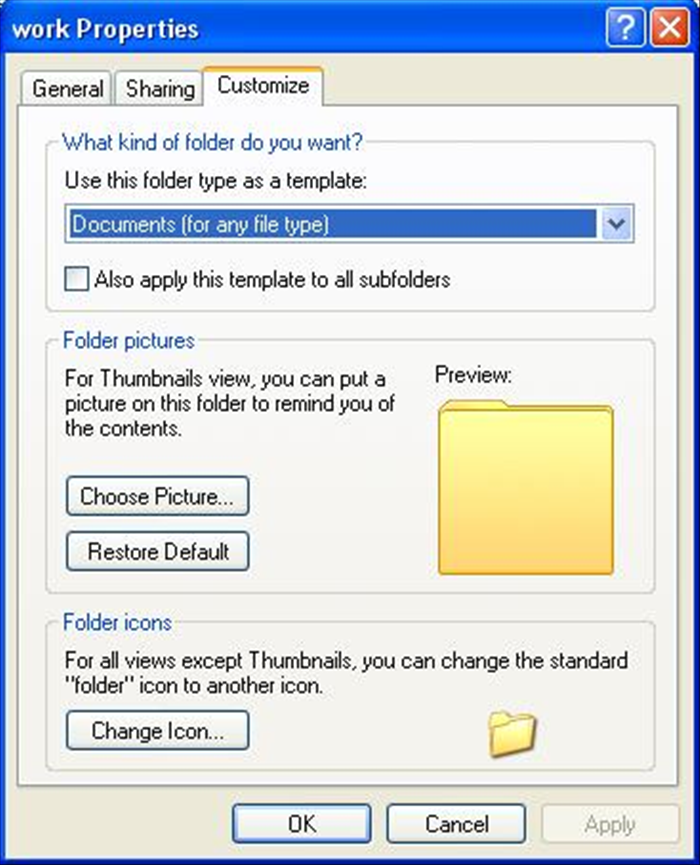

 בחלון שנפתח ביחרו בלשונית ה"customize" ולחצו על כפתור ה"Choose picture"
 -
- 3
Step 3
 ביחרו תמונה וליחצו OK. תמונה מקדימה של התיקיה תוצג במסך. ליחצו על OK וסיימתם.