How to fix an iPad stuck in a black screen and is not responding
This guide will explain how to repair / fix an iPad stuck with a black screen and does not respond / turn on. Sometimes IPad, like any other computer. needs to boot (reset) Reset solves many software problems. Reset does not erase the data on the iPad.
Easy 902 views
What You'll Need
- ipad reset
Steps
- 1
Step 1
 The following steps should be done when the iPad is not connected to the computer! Hold the Home button and the Sleep/Wake button at the same time.
 - 2
Step 2
Continue to hold the buttons even when the off appears on the screen. -
- 3
Step 3
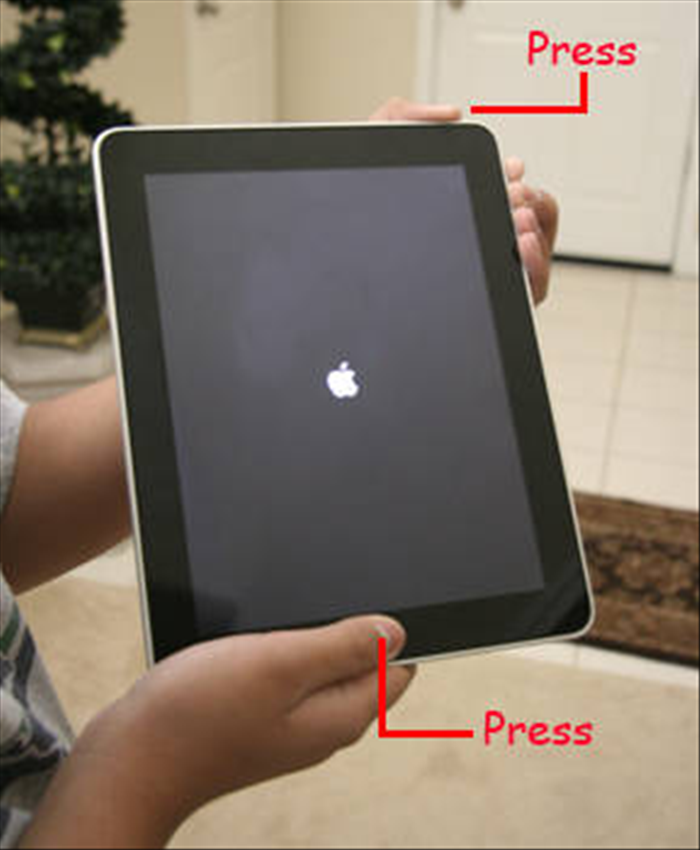 After a few seconds the iPad will shut down and will turn on again. After the iPad turns on let go of the two buttons.
 - 4
Step 4
That's it, you did reset to the iPad. You may need to recharge it.