How to Secure Your Database for Free with GreenSQL: A Comprehensive Guide
Protect your database from SQL injection and other threats without spending a dime. This comprehensive guide will walk you through installing and configuring GreenSQL Free to monitor and secure your database effectively.
In today's digital landscape, database security is paramount. Data breaches can lead to significant financial losses, reputational damage, and legal repercussions. While many robust database security solutions come with a hefty price tag, it is possible to significantly enhance your database protection using free, open-source tools. This guide will introduce you to GreenSQL, a powerful database firewall and monitoring tool, and show you how to install and configure its free version to safeguard your data against common threats like SQL injection attacks.
GreenSQL offers an excellent solution for those looking to implement a database firewall and monitor suspicious activity without a significant investment. It acts as a proxy between your application and database, analyzing all SQL queries in real-time. The free version provides essential features for small to medium-sized projects.
What is GreenSQL and Why Use It?
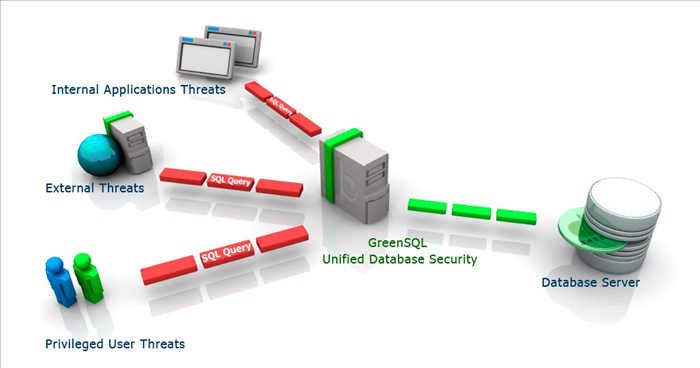
GreenSQL is an open-source database security solution designed to protect databases from various attacks, most notably SQL injection. It functions as a database firewall (DBF) that inspects SQL queries before they reach your database. Key features of the free version include:
- SQL Injection Prevention: Detects and blocks known SQL injection patterns.
- Real-time Monitoring: Monitors all database activity and alerts you to suspicious queries.
- Audit Logging: Logs all executed queries, providing a clear audit trail.
- Policy Enforcement: Allows you to define security policies to control database access and operations.
While GreenSQL Free offers substantial protection, it's important to understand its limitations compared to the enterprise version, such as less advanced reporting, limited scalability, and community-only support.
Step 1: Prepare Your Linux Server
First, ensure your server's packages are up-to-date. Open your SSH client and connect to your server. Then run the following commands:
For Ubuntu/Debian:
sudo apt update
sudo apt upgrade
For CentOS/RHEL:
sudo yum updateAlso, install any necessary dependencies for GreenSQL. This may vary slightly depending on your Linux distribution and GreenSQL version, but common dependencies include libmysqlclient-dev (for MySQL) or libpq-dev (for PostgreSQL) and build-essential.
For Ubuntu/Debian (MySQL example):
sudo apt install build-essential libmysqlclient-devFor CentOS/RHEL (MySQL example):
sudo yum install gcc make mysql-develStep 2: Download GreenSQL Free Version
Navigate to the GreenSQL official website or a trusted open-source repository to download the latest free version. Look for the source code package (.tar.gz or .zip).
Alternatively, you can often download it directly to your server using wget:
wget http://downloads.greensql.com/greensql-fw-current.tar.gzUnpack the downloaded archive:
tar -xvf greensql-fw-current.tar.gz
cd greensql-fw-*Step 3: Compile and Install GreenSQL
Once inside the GreenSQL source directory, compile and install the software. The standard procedure involves:
./configure --with-mysql=/usr/bin/mysql_config
make
sudo make install
Replace --with-mysql=/usr/bin/mysql_config with the appropriate path for your database client development files (e.g., --with-pgsql=/usr/bin/pg_config for PostgreSQL). If you encounter errors, check the configure script output for missing dependencies and install them.
Step 4: Basic Configuration of GreenSQL
After installation, you'll need to configure GreenSQL. The main configuration file is usually greensql.conf (location may vary, commonly in /etc/greensql/ or /usr/local/etc/greensql/).
Edit the configuration file using a text editor like nano or vi:
sudo nano /etc/greensql/greensql.confKey parameters to adjust:
-
listen_port: The port GreenSQL will listen on (e.g.,3307for MySQL). -
db_host: The IP address or hostname of your actual database server. -
db_port: The port of your actual database (e.g.,3306for MySQL). -
log_file: Path to the log file. -
rules_file: Path to the security rules file.
Example greensql.conf snippet for MySQL:
[greensql]
listen_port = 3307
db_host = 127.0.0.1  ; Or your database server IP
db_port = 3306
log_file = /var/log/greensql.log
rules_file = /etc/greensql/rules.conf
Save and exit the file.
Step 5: Start GreenSQL and Test Connectivity
Start the GreenSQL daemon:
sudo greensql_daemon startNow, you need to configure your applications to connect to GreenSQL's listen_port (e.g., 3307) instead of directly to your database's port (e.g., 3306).
Test the connection from your application or using a database client. For example, if using MySQL CLI:
mysql -h 127.0.0.1 -P 3307 -u your_db_user -pEnter your database password. If successful, you are now routing through GreenSQL.
It's highly recommended to configure GreenSQL to start automatically on system boot. The exact method depends on your Linux distribution (e.g., systemd service, init.d script). Refer to your distribution's documentation for setting up services.
Step 6: Configure Security Rules for SQL Injection Prevention
GreenSQL's core strength lies in its ability to enforce security rules. Edit the rules.conf file specified in your greensql.conf:
sudo nano /etc/greensql/rules.confThis file uses a simple syntax to define what queries are allowed or blocked. GreenSQL typically comes with a set of default rules to detect common SQL injection patterns.
Example Rule for Blocking Simple SQL Injection (illustrative):
[default]
sql_injection_protection = on
GreenSQL automatically employs a set of heuristic rules for SQL injection detection. You can also define custom rules. For advanced rule configuration, refer to the GreenSQL documentation available on their website.
After modifying rules, restart GreenSQL for changes to take effect:
sudo greensql_daemon restartStep 7: Monitor Database Activity and Audit Logs
GreenSQL logs all database activity, especially suspicious queries, to the log_file specified in greensql.conf (e.g., /var/log/greensql.log).
You can view the logs in real-time:
tail -f /var/log/greensql.logLook for entries indicating blocked queries, SQL injection attempts, or unusual access patterns. Regularly reviewing these logs is crucial for maintaining database security and identifying potential threats.
Always test new GreenSQL configurations and rules in a development or staging environment before deploying them to a production system. Incorrect rules can inadvertently block legitimate database operations, leading to application downtime.
Troubleshooting Common GreenSQL Issues
While GreenSQL is generally stable, you might encounter some issues:
- GreenSQL fails to start: Check
greensql.conffor syntax errors, ensure thelog_fileandrules_filepaths are correct and writable, and verify that thelisten_portis not already in use. - Application cannot connect to database: Confirm your application is connecting to GreenSQL's
listen_port(e.g., 3307) and not directly to the database port (e.g., 3306). Check firewall rules on your server to ensure thelisten_portis accessible. - Legitimate queries are blocked: Review your
rules.conf. Ifsql_injection_protectionis too aggressive, or if custom rules are too broad, they might block valid queries. You may need to refine your rules or whitelist specific query patterns.
General Database Security Best Practices
Beyond GreenSQL, a holistic approach to database security is essential:
- Use Strong Passwords: Implement complex, unique passwords for all database users and rotate them regularly.
- Principle of Least Privilege: Grant database users only the minimum necessary permissions to perform their tasks. Avoid using
rootoradminaccounts for daily application operations. - Keep Software Updated: Regularly patch your operating system, database software, and any related applications to protect against known vulnerabilities.
- Network Security: Implement firewalls to restrict database access to only authorized IP addresses and applications.
- Data Encryption: Encrypt sensitive data at rest (on disk) and in transit (over the network).
- Regular Backups: Implement a robust backup and recovery strategy to ensure data availability in case of a breach or data loss event.
By following this guide, you've taken a significant step towards securing your database using GreenSQL Free. Remember that security is an ongoing process. Continuously monitor your logs, update your systems, and review your security policies to adapt to evolving threats. Combining tools like GreenSQL with solid security best practices provides a strong defense against database attacks, ensuring your data remains safe and secure.